Construction site records on Android

    Site Photo Report PDF

    From site photographs to a clear record of progress.

    Prepare site photo reports, daily progress reports, inspection records and meeting minutes on your phone. Organise evidence, collect handwritten signatures and customise templates for site supervision and project handover.

    Android · Google Play · Features and limits depend on the FREE or PRO plan
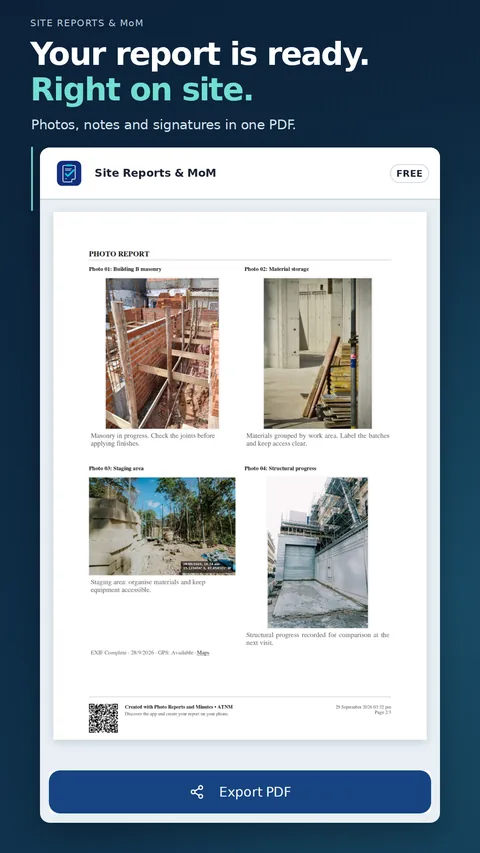
    Site Photo Report PDF showing construction photographs organised in a report ready to share
    The app in context

    Follow the work, one step at a time.

    Explore site photographs, handwritten signatures, daily site reports, checklists and templates through examples from the app.

    Guided walkthrough

    Give every photo its context

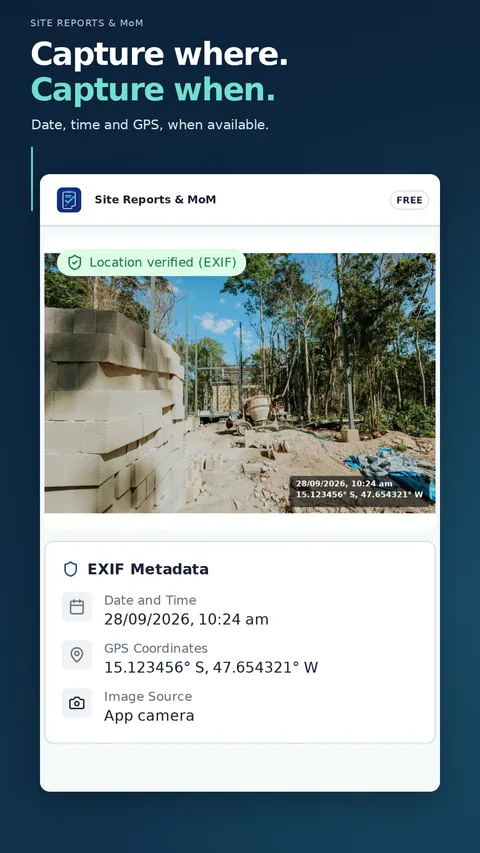
    Capture or import photos and check their available date, time and location. Keep the evidence and its context together.

    • Camera and multiple gallery selection
    • Photo titles, descriptions and order
    • Available metadata in PDFs, including FREE
    Application example: GPS & photos
    GPS & photos
    Complete feature inventory

    Features and plan limits, explained clearly.

    See how each tool supports documentation, review and delivery from the site.

    01

    Photos and inspection records

    Keep the evidence organised from capture to delivery.

    • Capture photos or import several from the gallery
    • Titles, descriptions, ordering and available metadata
    • Photographic reports, inspection records and meeting minutes
    • Participants, observations and responsible people
    02

    Record organization

    Keep every record easy to find and ready for the next activity.

    • Construction project, responsible person and participants
    • Notes, titles, tags, search and record status
    • Photographic reports, inspection records and meeting minutes
    • Duplicate records and select which information to reuse
    03

    Daily construction reports

    Keep each day's work organised by section.

    • Weather and working conditions
    • Labor, equipment and materials
    • Activities with quantity and unit
    • Incidents, impacts, actions and conclusion
    04

    Construction checklists

    Connect each inspection item with evidence and follow-up.

    • Compliant, noncompliant and not applicable results
    • Summary excluding not applicable items
    • Notes and photos for each item
    • Action, responsible person and resolution deadline
    05

    Technical inspections and custom templates

    Use a built-in structure or adapt a template to your work.

    • Simple Report and Technical Inspection Report with 17 sections
    • Contract, measurements, quality and risks
    • Evidence, follow-up, response and conclusion
    • Built-in templates preserved; customisable copies
    06

    Visual review and signatures

    Highlight the finding and collect confirmation on the record.

    • Photo markup and signatures in FREE and PRO
    • Arrows, circles, rectangles and numbered markers
    • Audit information associated with the signature
    • New signatures required on a duplicated record
    07

    Document presentation and identity

    Choose a clear presentation for each delivery.

    • PDF preview and export
    • 1, 2, 4, 6 or 8 photos per page in photographic reports
    • Three layouts, logo and watermark in PRO
    • Excel PRO for photographic reports, inspection records and meeting minutes
    08

    Local operation

    Keep the main field workflow and records on your own device.

    • Main workflow works offline-first
    • Records saved locally
    • No app account or automatic cloud backup
    • Share through apps installed on Android
    Field documents

    Keep a clear record of the work.

    Choose the document for your task, review the PDF and share it through an Android app of your choice.

    01

    Photos and minutes

    Photographic reports, inspection records and meeting minutes with photos, participants, observations and signatures. PDF and Excel PRO.

    02

    Daily site progress

    Daily site reports with labour, equipment, activities, materials, incidents and photographs. PDF export for sharing and review.

    03

    Checks and technical inspections

    Checklists with evidence and actions; technical inspection reports with 17 sections. PDF export.

    04

    Your own structure

    Simple Reports and custom templates with fields and sections adapted to your work. PDF export.

    Plans

    Start with FREE. Move to PRO as your work grows.

    Check what each plan includes before installing the app.

    To get started

    FREE

    • Up to 5 active records shared across modules
    • Up to 6 photos per exported document
    • 5 PDFs per month shared across modules
    • 2 re-exports of the same document within 30 minutes without using another export
    • 1 custom template and access to built-in templates
    • Photo markup, handwritten signatures and available metadata in the PDF
    • Basic layout with FREE identification
    Download free
    For your professional workflow

    PRO

    • No plan-imposed limit on records, photos or PDFs
    • No plan-imposed limit on custom templates
    • Three layouts for photographic reports and minutes
    • Excel for photographic reports, inspection records and meeting minutes
    • Logo, watermark and institutional details
    • Storage limited by your device's capacity
    Explore PRO in the app
    Frequently asked questions

    Choose your document and understand the limits.

    Document clarity

    Understand what accompanies your report.

    Signatures are electronic handwritten signatures; they are not cryptographically certified digital signatures.

    PDF and Excel exports are documents and do not restore the editable app record.

    Purchases, subscription restoration, PRO validation and the app used to share files may require an internet connection.

    Complete your field toolkit

    Medir Obras: Trena

    Measure lengths, areas and volumes with Medir Obras: Trena. Its product page is available in Portuguese.

    Explore Medir Obras: Trena